
You might find yourself wondering how to view IP addresses that have accessed RDP on your Windows VPS, or how to review the RDP access log to see who logged in last. This quick how-to will show you how to use the Event Viewer in Windows Server.
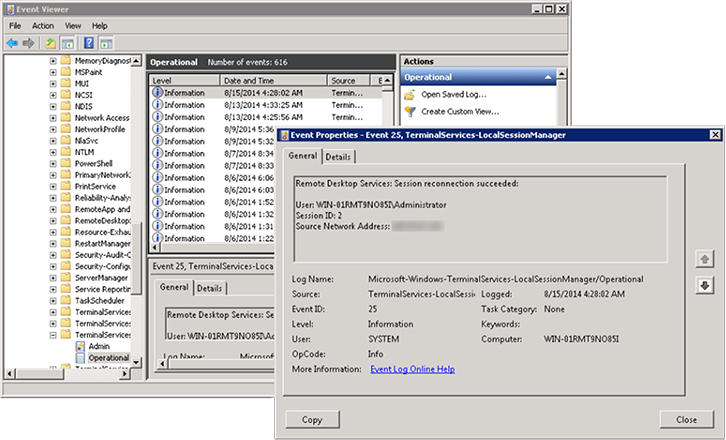
First, open Event Viewer (you can search in the Start menu). Then, navigate to:
Applications and Services LogsMicrosoftWindowsTerminalServices-LocalSessionManager
Under that view, double-click to open the ‘Operational’ view. You can double-click the entries to see more information about when they were logged, including the origin IP address:
This process applies to:
Lightning-fast VPS hosting with enterprise SSD storage, global data centers, and 99.99% uptime. Built for developers, trusted by enterprises.
support@solvps.com
1-888-256-8213
These cookies are essential for the website to function and cannot be switched off.
These cookies enable enhanced functionality and personalization, such as live chat or video.
These cookies help us understand how visitors interact with the website (for example Google Analytics).
These cookies are used to deliver and measure advertising (for example Meta Pixel, LinkedIn Insight, Google Ads).